Gig & practice tools for your pocket.
A selection of your BassEducation practice tools, rebuilt as native iPhone and iPad apps.





BassEducation Metronome
Most metronomes keep time. This one builds grooves. And runs your click.
Open it, hit Start, and you've got a great-sounding click. No menus to dig through. The depth is there when you want it: any tempo, any meter (including odd ones you build yourself), three-level accents, subdivision faders, swing, and a practice coach.
- Odd + custom meters
- Three accent levels
- Subdivision faders + swing
- Practice coach
- Harmonic drone
- Background + lock-screen play
Pro Modes (one-time) adds a Library for saving grooves, glanceable Live stage screen, set lists, and more sounds, built to run your click.



On Setapp it’s a Mac edition for a one-time $12.99, with the Library and Pro sounds built in. Live mode and set lists are App Store only.


BassEducation Tuner
A strobe-precision tuner that's listening the moment it opens.
Play and it locks on: no buttons. Pick your instrument and it tunes its detection to your range. The strobe shows fine intonation in real time, and a pitch pipe lets you check any note by ear. On a loud stage, plug straight in with a USB-C interface and it reads the cable, not the room.
- Zero-setup auto-listen
- Strobe + needle views
- Instrument presets
- Sweetened tunings + temperaments
- Pitch pipe
- Horn transposition (Bb/Eb)


BassEducation Ear Trainer
Great ears aren't a gift. They're a habit. Build yours a few minutes at a time.
Hit Play and name what you hear across four modes (intervals, chord quality, modal color, and scale degrees), all on a warm, real sampled piano. Difficulty grows as you level up, with a built-in coach and printable cheat-sheets.
Or switch to Free Play to explore any interval or chord.
- Four training modes
- Free Play explore mode
- Real sampled piano
- Adaptive difficulty
- Built-in coach
- Printable cheat-sheets


BassEducation Composer
See where the harmony can go, and why.
Start on any chord and Composer shows you the moves that actually work next, and tells you why each one pulls the way it does. Hear every idea on a warm sampled piano with the bass on the roots, then read the whole thing back as a clean lead sheet.
- Suggested next chords
- The “why” behind every move
- Real sampled piano + bass
- Lead-sheet chart view
- Reshape voicings & bass notes
- Save & share progressions
- Slash-chord support
- Custom chord entry & lead-sheet export


BassEducation Fretboard
The bass player's shape notebook.
Pick any scale or mode and see it laid out on the neck as a shape you can actually grab, built bass-first for 4, 5, and 6 strings. Save the fingerings you use, label the notes that matter, and pull any scale from a searchable library when it's time to practice something new.
- Bass-first: 4, 5 & 6-string
- Every scale & mode as a shape
- Create & save your own shapes
- Label any note on the neck
- Searchable scale library
- Ordered practice sets
- One-tap spotlight on all chord tones
- Chord type display for most every scale
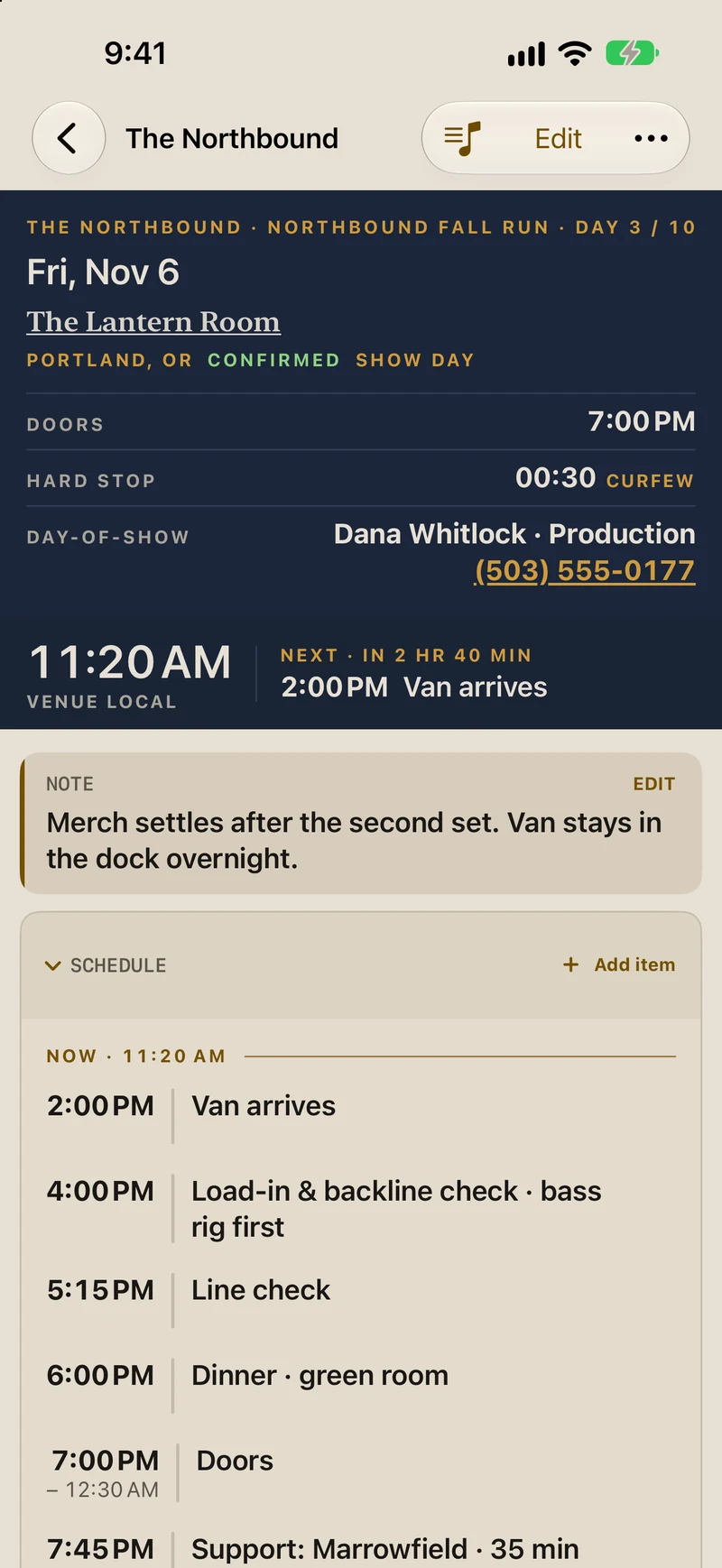
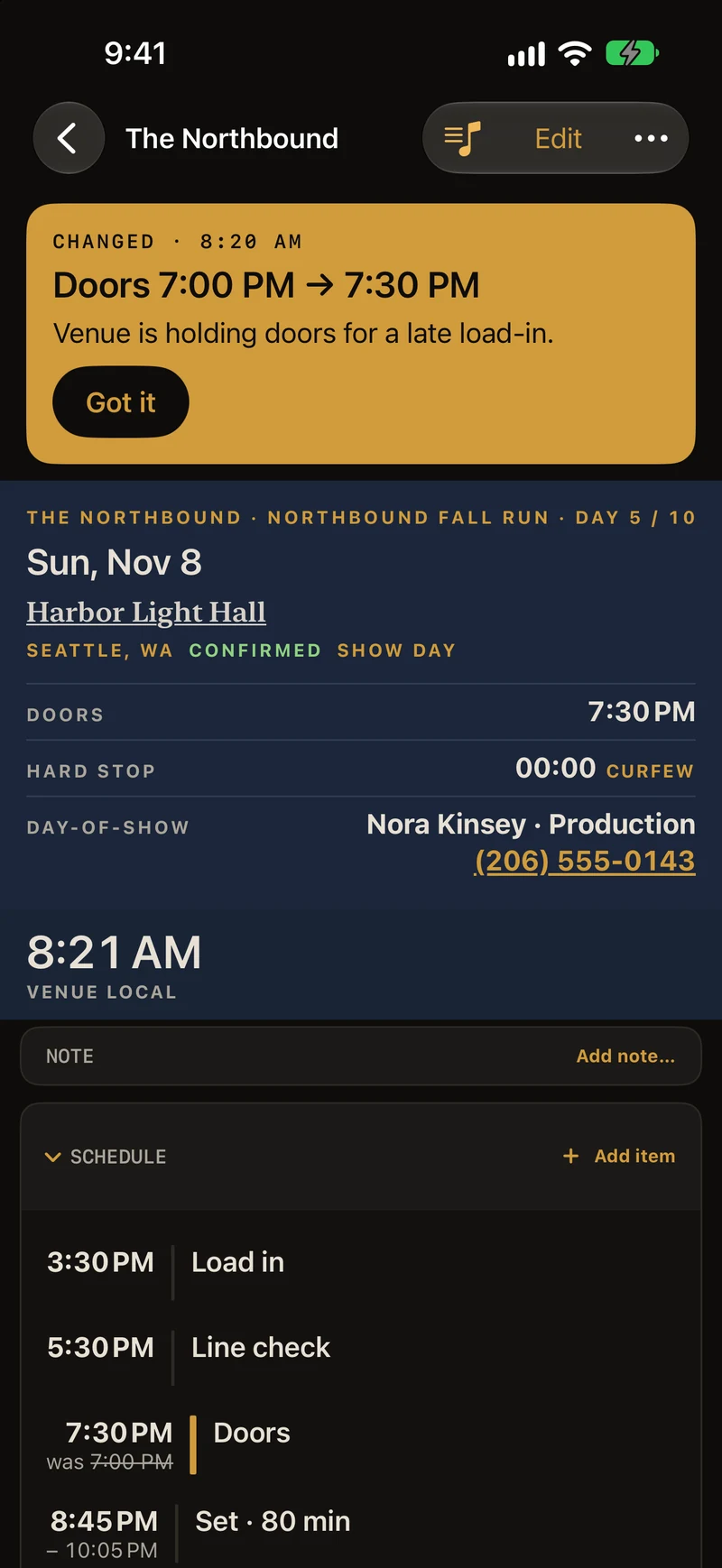
ManiFest: Gig & Tour Planner
Built by a working bass player.
One sheet per gig: load-in, the room, the lineup, the set, who to call. Your band opens a link. No account, no app, nothing to forget.
Per Diems, part of the full version. Tell ManiFest where home is, and it works out your days away from your dates and totals the year. It covers dates in the US and abroad, using the US government’s domestic and international meals rates for where you slept. Export a PDF or CSV for your tax software or preparer. Made for US tax records, not tax advice.
You pay once. Not every month. Once. It covers every band you own and everyone you invite to edit them. Anyone who just needs to see the information is free, forever.
- Holds & confirms
- Share a link: no account needed
- Works offline
- Saved setlists
- Duplicate a gig
- Venue autofill
- Changes the band can’t miss
- Guest lists with a cutoff
- Single-gig links for subs
- Bandsintown export
- Print day sheets, with a QR code
- iPhone, iPad & Mac

Questions or feedback about any of the apps? Email support@basseducation.com and a human will answer. You can also read the privacy policy or the app terms.